
FHIR implementation guide of AP-HP FormBuilder
1.0.0 - ci-build

FHIR implementation guide of AP-HP FormBuilder
1.0.0 - ci-build
FHIR implementation guide of AP-HP FormBuilder - Local Development build (v1.0.0) built by the FHIR (HL7® FHIR® Standard) Build Tools. See the Directory of published versions
The AP-HP FormBuilderis a fork from the LHC Form Builder developped by the Lister Hill National Center for Biomedical Communication (LHC).
This tool allows creation/edition of FHIR Questionnaire (FHIR R4). It also embeds some features to allow CodeSystem and ValueSet use in Questionnaire. Lastly, it takes advantage of other tools developped by the LHC (lforms, preview…).
LHC Form Builder manage some of the FHIR extension detailled in the Structured Data Capture (SDC) Implementation Guide:
Some other extension were however necessary for the AP-HP FormBuilder to equip a CDW integration pipeline.
Plus, the UX/UI was modified:
Sources are available here.
The FormBuilder repository indicates how you can run the FormBuilder.
Warning: by default the FormBuilder back end is set to the R4 public demo instance of HAPI. It is therefeor not possible to ensure that all the backend requirement are and will be fullfilled at any time to any user. That may explain some issue using the FormBuilder.
The landing page offers the opportunity to:
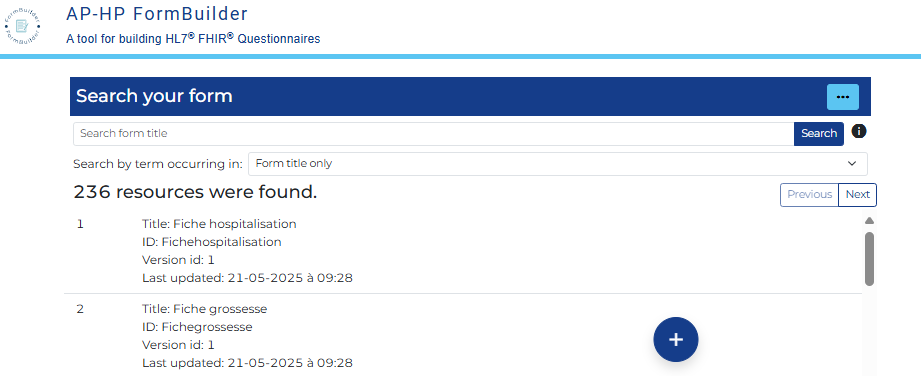
Using this button:  on the top right of the landing page, the user may:
Once a form is open, there is a bar on top of the screen that gather some quick actions:

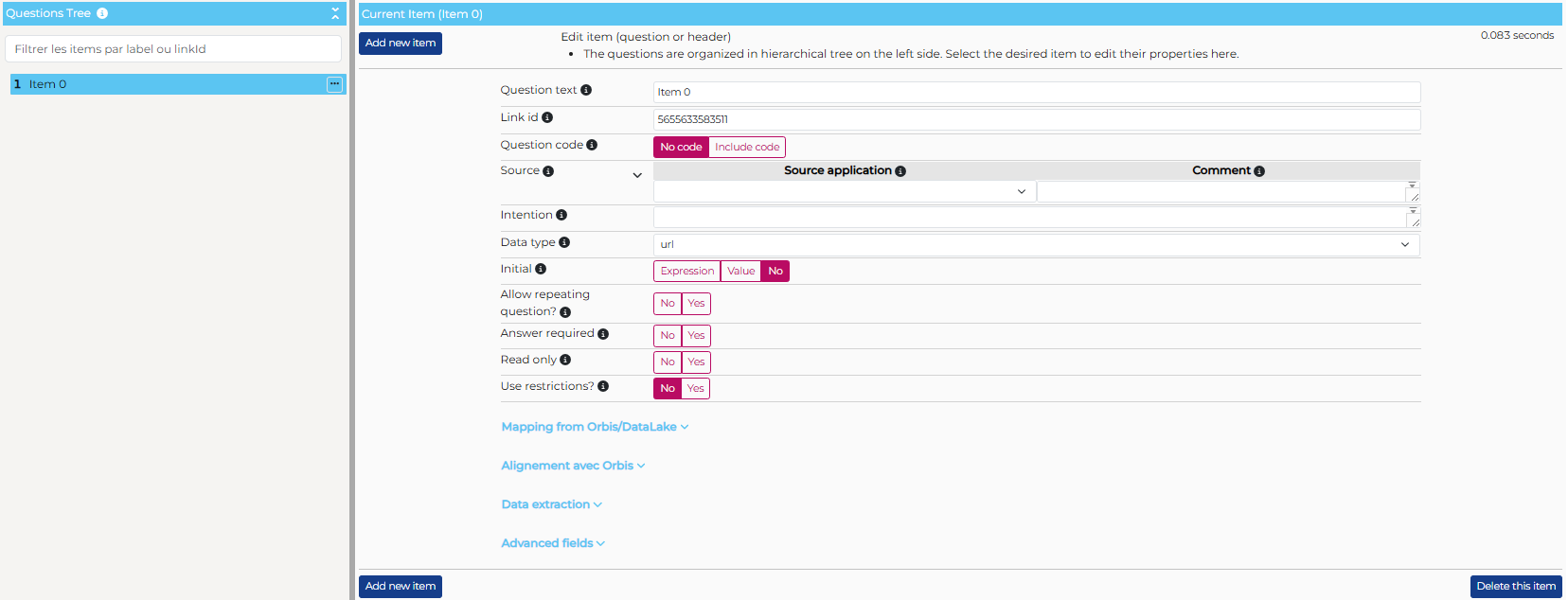
This is the main working interface
On the left part of the screen, there is the Questionnaire items tree. It allows :
On the right part of the screen, the details of the selected item are displayed and can be modified. Main item properties are:
| Field designation | Sub-field / button | FHIR Item property | Comment | Condition |
|---|---|---|---|---|
| Question text | text | It is the label of the item for the respondant, and in the item hierarchy | ||
| Link id | linkId | Unique id for the item in the Questionnaire. The AP-HP FormBuilder generates it | Mandatory read only |
|
| Question code | code | Concept that represents the overall questionnaire | ||
| Source | Source application | extension:QuestionnaireItemSource. extension:source.valueUri |
Identification of the software that should contain the information required for this item. This field rely on a ValueSet, to set up, that agregate the software of interest in the information system | |
| Comment | extension:QuestionnaireItemSource. extension:comment.valueString |
Provide more information on the source software | ||
| Intention | item.text (based on the questionnaire-itemControl extension) | Provide additional information on the meaning of the item, when the text is not clear enough | ||
| Data type | type | It is the item type ('boolean', 'choice', 'decimal'...) | Mandatory | |
| Reference resource | extension:questionnaire-referenceResource. valueCode |
Resource type for the expected reference | If "Data type = Reference" | |
| Answer list source | NA |
Setup modality of (open-)choice items:
|
||
| Answer choices | System | answerOption. valueCoding.system |
Canonical url of the CodeSystem in which this answer is coded | If "Answer list source = Answer options" |
| Code | answerOption. valueCoding.code |
Code of this answer in the specified CodeSystem | If "Answer list source = Answer options" | |
| Display | answerOption. valueCoding.display |
Label that is displayed to the user (not necessarily the main CodeSystem label for this code) | If "Answer list source = Answer options" | |
| Default | answerOption. initialSelected |
Identify the answer initialy selected for this item | If "Answer list source = Answer options" | |
| Add another answer | NA | Add a row in the answer choices table | If "Answer list source = Answer options" | |
| Generate the corresponding ValueSet | NA | Create a ValueSet from the information available in the Answer choice table (see the terminology management pages, and especially, the AnswerOption to ValueSet switch) | If "Answer list source = Answer options" | |
| Answer value set | answerValueSet | Canonical url of the ValueSet that contains the possible answer for this item | If "Answer list source = Answer value set URI" | |
| Edit answer value set | NA | This button lead to a ValueSet search engine. Selecting a ValueSet through this search engine will set the "Answer value set" field with the corresponding cannonical url (see the ValueSet selector section) | If "Answer list source = Answer value set URI" | |
| Answer expression | description | extension:sdc-questionnaire-answerExpression. valueExpression.description |
A human friendly description of the logic that drive the list of choice for the current item | If "Answer list source = Answer expression" |
| language | extension:sdc-questionnaire-answerExpression. valueExpression.language |
The language in which the logic is coded | If "Answer list source = Answer expression" Mandatory |
|
| expression | extension:sdc-questionnaire-answerExpression. valueExpression.expression |
The coded expression that is executed to construct the list of choice | If "Answer list source = Answer expression" | |
| Initial | NA |
Setup modality of the initial value
|
||
| Initial value | (Value) | initial.value[x] | A fixed initial value | If "Initial = Value" |
| Unit |
initial.valueQuantity.unit initial.valueQuantity.system initial.valueQuantity.code |
The unit of the initial value (UCUM expressed) | If "Data type = quantity and Initial = Value" | |
| Add another value | NA | Add an initial value | If "Initial = Value and Allow repeating question? = Yes" | |
| Initial expression | description | extension:sdc-questionnaire-initialExpression. valueExpression.description |
A human friendly description of the logic that drive the variable initial value for the current item | If "Initial = Expression" |
| language | extension:sdc-questionnaire-initialExpression. valueExpression.language |
The language in which the logic is coded | If "Initial = Expression" mandatory |
|
| expression | extension:sdc-questionnaire-initialExpression. valueExpression.expression |
The coded expression that is executed to set up the initial value | If "Initial = Expression" | |
| Units | extension:questionnaire-unit.valueCoding |
For decimal and integer : hard coding of the unit (UCUM expressed) For quantity, multiple unit (UCUM expressed) from which the respondant will select one. |
If "Data type in (decimal, integer, quantity)" | |
| Allow repeating question? | repeats | If the respondant can provide more than one answer to the item | ||
| Answer required | required | If an answer SHALL be provided by the respondant | ||
| Read Only | readOnly | If the respondant cannot modify the field content | ||
| Use restrictions? | No / Yes | NA | Is there a restriction on the value that are acceptable from the respondant ? | If "Data type not in (boolean, date, dateTime, time, choice, attachment, header)" |
| Restriction | NA | The kind of restriction to set up | If "Use restriction?.No / Yes = Yes" | |
| Value |
maxLength extension:minLength.valueInteger extension:regex.valueString extension:maxDecimalPlaces.valueInteger extension:minValue.valueDecimal extension:maxValue.valueDecimal |
The value of the restriction | If "Use restriction?.No / Yes = Yes" | |
| Value for item extraction context | NA |
Setup context for item extraction :
|
||
| Code | extension:sdc-questionnaire-itemExtractionContext. valueCode |
The resource type to be extracted | If "Value for item extraction context = Value" | |
| Expression | description | extension:sdc-questionnaire-itemExtractionContext. valueExpression.description |
The human friendly description of the resource that SHOULD be updated | If "Value for item extraction context = Expression" |
| language | extension:sdc-questionnaire-itemExtractionContext. valueExpression.language |
The language in which the item extraction logic is coded | If "Value for item extraction context = Expression" | |
| expression | extension:sdc-questionnaire-itemExtractionContext. valueExpression.expression |
The coded expression that is executed to select the resource to update | If "Value for item extraction context = Expression" | |
| Definition | URL structure de definition | definition | Canonical url of the resource type that should be extracted | |
| Fhirpath | definition | Resource property that should be filled with the item answer | ||
| Subject item | extension:sdc-questionnaire-isSubject. valueBoolean |
Indicates that the subject of the item is or not the subject of the QuestionnaireResponse | If "Data type" = "Reference" | |
| Variables | Name | extension:variable. valueExpression.name |
The name of the variable that can be used in any coded expression (under the current item only) | |
| Language | extension:variable. valueExpression.language |
The language in which the evaluation of the variable is coded | Mandatory | |
| Expression | extension:variable. valueExpression.expression |
The coded expression that is executed to evaluate the variable | ||
| Add | NA | Add another variable | ||
| Conditional display | Question | enableWhen.question | Define the item whose response will be evaluated (left operand) | |
| Operator | enableWhen.operator enableWhen.answerBoolean |
Define the operator that will serve to compare left and right operand | ||
| Answer | enableWhen.answer[x] | Define the right operand for the condition evaluation | ||
| Show this item when | enableBehavior | Specify if all the condition previously specified must be respected or only one | ||
| Hidden item | extension:questionnaire-hidden. valueBoolean |
If yes, the curent item, and all its descendant are not shown to the respondant. These items may contain information that are relevant for data extraction, score computation... | ||
| Calculated | NA |
Set up the dynamic calculated value
|
||
| Expression | description | extension:sdc-questionnaire-calculatedExpression. valueExpression.description |
A human friendly description of the logic that drive the calculated value for the current item | If "Calculated = Expression" |
| language | extension:sdc-questionnaire-calculatedExpression. valueExpression.language |
The language in which the logic is coded |
If "Calculated = Expression" Mandatory |
|
| expression | extension:sdc-questionnaire-calculatedExpression. valueExpression.expression |
The coded expression that is executed to set up the calculated value | If "Calculated = Expression" |
The AP-HP FormBuilder offers the possibility to generate a ValueSet from the specified answer choices.
The conditions are the following:
It is possible to transform the answer choices of answer options item in ValueSet using the Generate the corresponding ValueSet button beneath the answer choices table. This action has 3 effects :
For '(open-)choice' item with 'Answer value set URI', it is possible to call the "ValueSet selector" using the button on the right side of the field.

the "ValueSet selector" allows search for the 'value set' to bind to the current item.
Three properties of ValueSet are searchable:
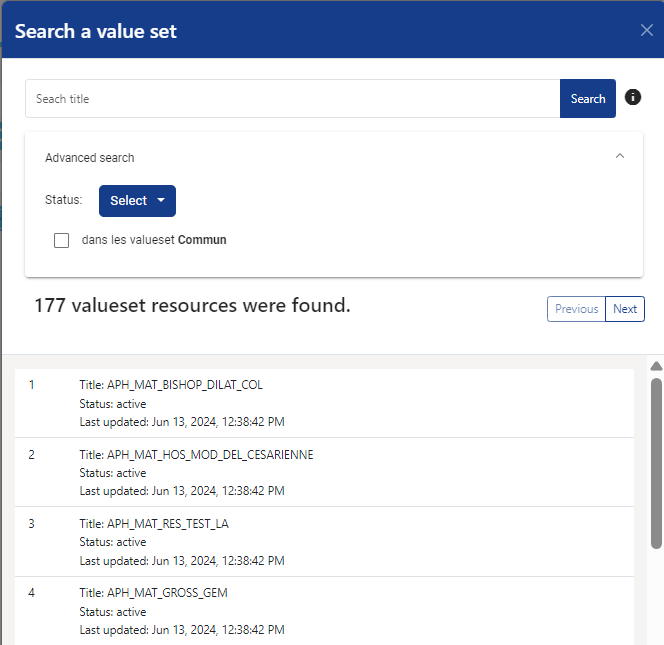
Clicking on the ValueSet tile of interest will lead the user to the item page with the answer value set field filled with the selected ValueSet canonical url.
There is two way to add an item in the item tree:
... buton in the item treeThere is two way to delete an item (and its descendent) in the item tree:
... buton in the item treeThere is two way to move an item (and its descendent) in the item tree:
... buton in the item treeThe ... butons in the item tree provide a duplicate feature. The duplicates are strictly the same as the duplicated item (conditional display for exemple), except for the linkId.
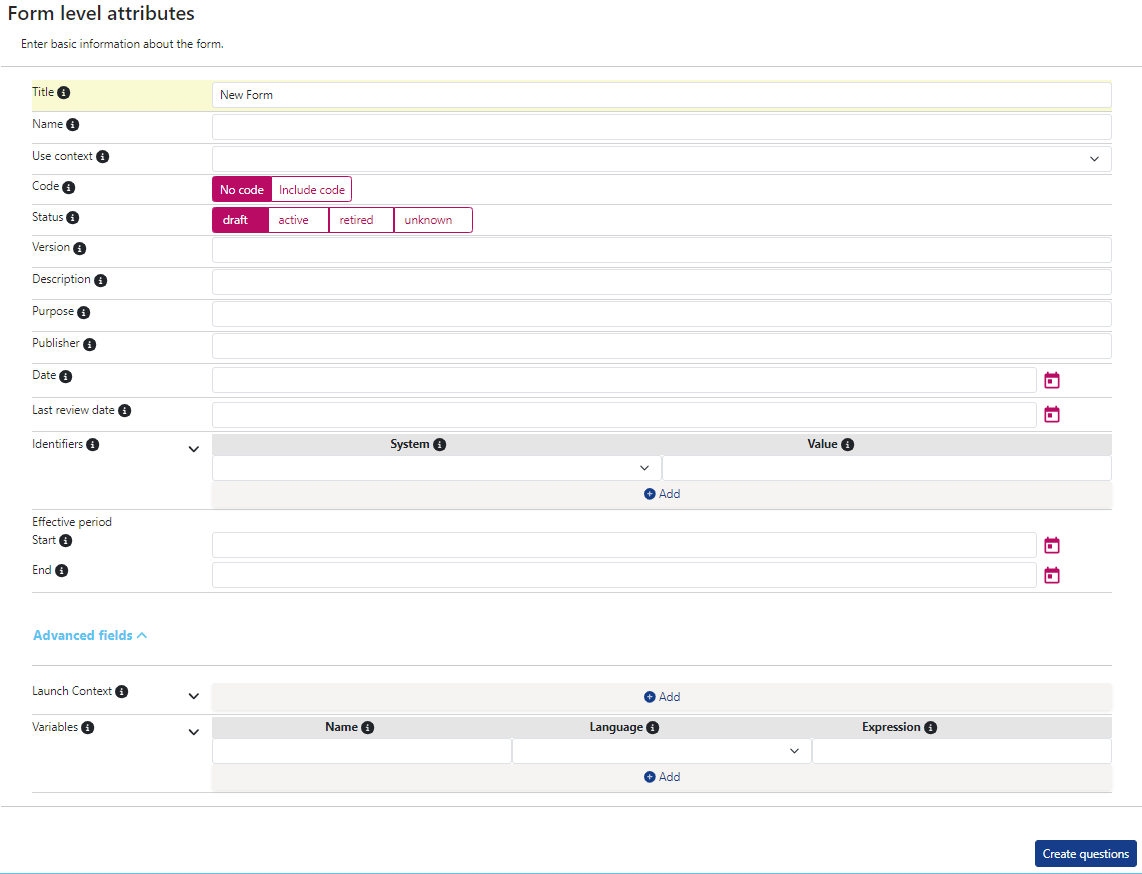
This interface allows the modification of the main Questionnaire properties.
| Field designation | Sub-field / button | FHIR Item property | Comment | Condition |
|---|---|---|---|---|
| Title | title | Usefull to search for the Questionnaire in FormBuilder | ||
| Id | id | Proposed automaticaly at Questionnaire creation from the title. It cannot be modified after creation. It is interesting to have Questionnaire.id that provide a minimal amount of information about content. | Read only | |
| Use context | useContext | This field allow the association of a Questionnaire to a program, which is also associated with CodeSystem and ValueSet. It is useful for vocabulary management with AP-HP FormBuilder | It is necessary to value this field to allow ValueSet creation. | |
| Code | code | Usefull if the Questionnaire is the FHIR translation of a form that is already identified in any codesystem, or to represent the Questionnaire in a CodeSystem | ||
| Status | status | |||
| Version | version | The business version of the Questionnaire. Each new business version of a Questionnaire SHOULD lead to the creation of a new Questionnaire instance with the same url but a new version. | Couple url/version SHALL be unique. | |
| Description | description | A short description of Questionnaire content | ||
| Purpose | purpose | |||
| Publisher | publisher | |||
| Date | date | It is the date corresponding to the last change in the questionnaire (business perspective) | Mandatory except for draft questionnaire | |
| Last review date | lastReviewDate | The date corresponding to the last review of the Questionnaire by business, whether it led to a change in Questionnaire or not. | ||
| Identifiers | System | identifier.system | A Questionnaire may have multiple identifier, in multiple namespace. | |
| Value | identifier.value | |||
| Add | ||||
| Effective period | Start | effectivePeriod.start | ||
| End | effectivePeriod.end | |||
| Url | url | Couple url/version SHALL be unique. | ||
| Meta source | meta.source | provide minimal information on Questionnaire provenance | ||
| Launch context | Name | extension:sdc-questionnaire-launchContext. extension:name.valueCoding |
Contextual element loaded for QuestionnaireResponse instanciation | |
| Type | extension:sdc-questionnaire-launchContext. extension:type.valueCode |
|||
| Description | extension:sdc-questionnaire-launchContext. extension:description.valueString |
|||
| Add | ||||
| Variables | Name | extension:variable. valueExpression.name |
Allow the definition of variable that can be used for intial expression, calculated expression, pre-population... of a QuestionnaireResponse. | |
| Language | extension:variable. valueExpression.language |
|||
| Expression | extension:variable. valueExpression.expression |
|||
| Add |
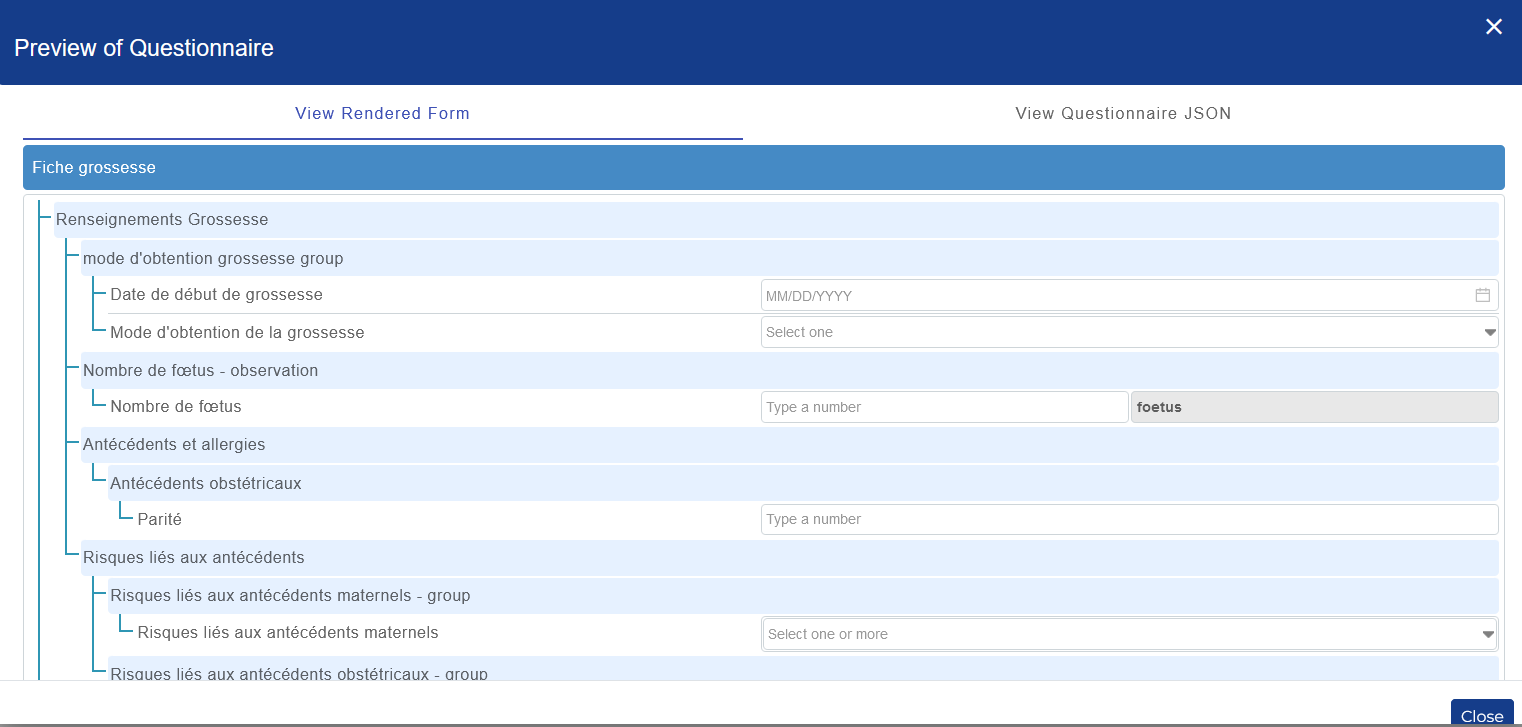
A frugal representation of the Questionnaire can be simulated. It is also possible to preview the JSON representation of the Questionnaire.
Warning: This feature rely on another library
The cloud_up button  save the form on the server. It is acknowledge by a pop-up that contains many Questionnaire top information

The cloud_down button  open a pop-up similar to the landing page that provide:
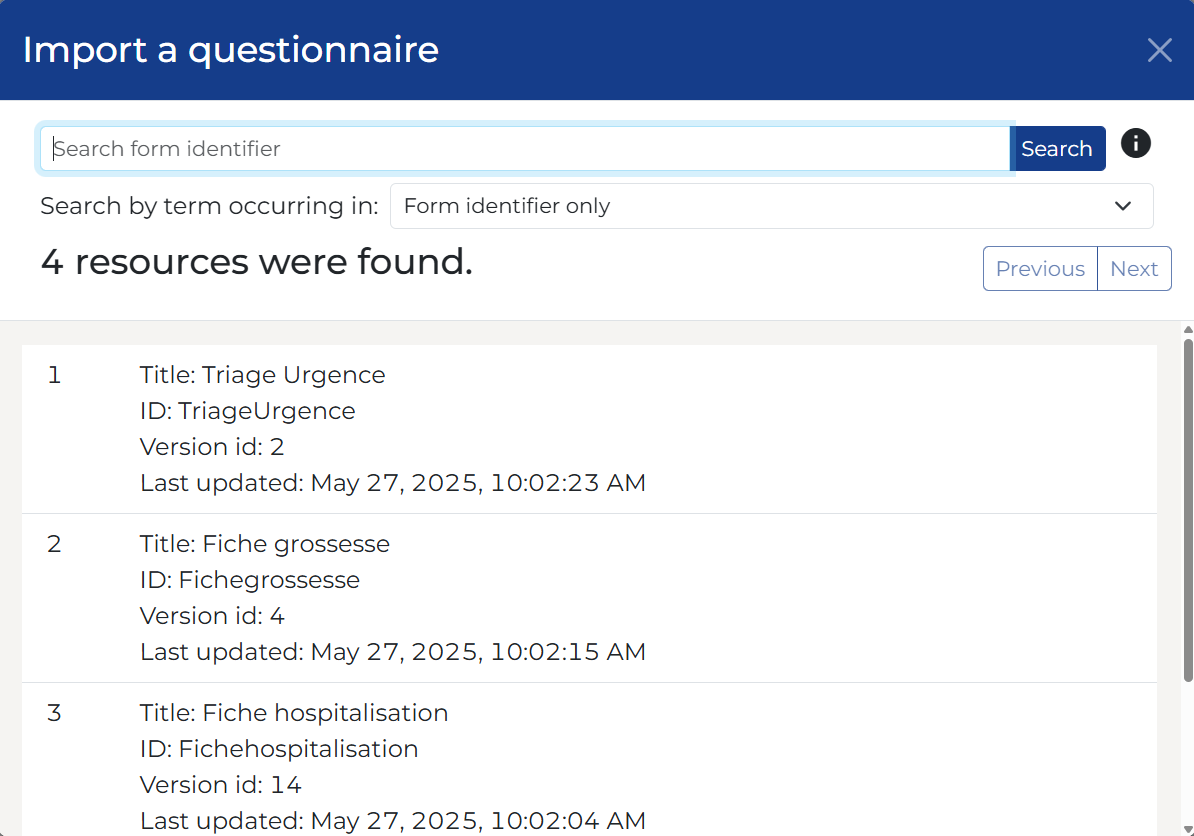
While the save operation update the instance of Questionnaire instance on the server, the duplication operation let the existing instance as is and create a new Questionnaire instance. It is usefull to create a new version of a Questionnaire.
This feature allow the loading of a Questionnaire from a JSON file, not necessarily available on the server.
To retrieve the JSON on your computer.
This feature execute the $validation operation on the current Questionnaire. The validation results are acknowledged by a pop-up that lists all the deviation from the norm.
This module allow the creation of CodeSystem/ValueSets from CSV files. It is not a full terminology management service… It is well described in the terminological module page
The Question mark buton in the quick action bar lead the user to this implementation guide.
The bug buton in the quick action bar lead the user to the github of the project where he can leave an issue.
IG © 2023+ AP-HP. Package aphp.fhir.fr.formbuilder#1.0.0 based on FHIR 4.0.1. Generated 2025-09-16
Links: Table of Contents |
QA Report
| 