Pipeline
The goal of EDS-NLP is to provide a framework for processing textual documents.
Processing textual documents, and clinical documents in particular, usually involves many steps such as tokenization, cleaning, named entity recognition, span classification, normalization, linking, etc. Organising these steps together, combining static and deep learning components, while remaining modular and efficient is a challenge. This is why EDS-NLP is built on top of a novel pipelining system.
Deep learning frameworks
Trainable components in EDS-NLP are built around the PyTorch framework. While you can use any technology in static components, we do not provide tools to train components built with other deep learning frameworks.
Compatibility with spaCy and PyTorch
While EDS-NLP is built on top of its own pipeline system, it is also designed to be compatible with the awesome spaCy framework. This means that you can use (non-trainable) EDS-NLP components in a spaCy pipeline, and vice-versa. Documents, objects that are passed through the pipeline, are in fact spaCy documents, and we borrow many of spaCy's method names and conventions to make the transition between the two libraries as smooth as possible.
Trainable components, on the other hand, are built on top of the PyTorch framework. This means that you can use PyTorch components in an EDS-NLP pipeline and benefit from the latest advances in deep learning research. For more information on PyTorch components, refer to the Torch component page.
Creating a pipeline
A pipeline is composed of multiple pipes, i.e., callable processing blocks, like a function, that apply a transformation on a Doc object, such as adding annotations, and return the modified object.
To create your first EDS-NLP pipeline, run the following code. We provide several ways to create a pipeline:
This is the recommended way to create a pipeline, as it allows auto-completion, type checking and introspection (you can click on the component or its arguments to see the documentation in most IDEs).
import edsnlp, edsnlp.pipes as eds

nlp = edsnlp.blank("eds")
nlp.add_pipe(eds.sentences())
nlp.add_pipe(eds.matcher(regex={"smoker": ["fume", "clope"]}))
nlp.add_pipe(eds.negation())
Curried components
Most components (like eds.matcher) require an nlp argument initialization. The above eds.matcher(regex={"smoker": ["fume", "clope"]}) actually returns a "curried" component, that will be instantiated when added to the pipeline. To create the actual component directly and use it outside of a pipeline (not recommended), you can use eds.matcher(nlp, regex={"smoker": ["fume", "clope"]}), or use the result of the nlp.add_pipe call.
Pipes can be dynamically added to the pipeline using the add_pipe method, with a string matching their factory name and an optional configuration dictionary.
import edsnlp  # or import spacy

nlp = edsnlp.blank("eds")  # or spacy.blank("eds")
nlp.add_pipe("eds.sentences")
nlp.add_pipe("eds.matcher", config=dict(regex={"smoker": ["fume", "clope"]}))
nlp.add_pipe("eds.negation")
You can also create a pipeline from a configuration file. This is useful when you plan on changing the pipeline configuration often.
nlp:
  "@core": pipeline
  lang: eds
  components:
    sentences:
      "@factory": eds.sentences

    matcher:
      "@factory": eds.matcher
      regex:
        smoker: ["fume", "clope"]

    negation:
      "@factory": eds.negation
and then load the pipeline with:
import edsnlp

nlp = edsnlp.load("config.yml")
You can also create a pipeline from a configuration file. This is useful when you plan on changing the pipeline configuration often.
[nlp]
@core = "pipeline"
lang = "eds"
pipeline = ["sentences", "matcher", "negation"]

[components.sentences]
@factory = "eds.sentences"

[components.matcher]
@factory = "eds.matcher"
regex = {"smoker": ["fume", "clope"]}

[components.negation]
@factory = "eds.negation"
and then load the pipeline with:
import edsnlp

nlp = edsnlp.load("config.cfg")
This pipeline can then be run on one or more texts documents. As the pipeline process documents, components will be called in the order they were added to the pipeline.
from pathlib import Path

# Processing one document
nlp("Le patient ne fume pas")

# Processing multiple documents
nlp.pipe([text1, text2])
For more information on how to use the pipeline, refer to the Inference page.
Hybrid models
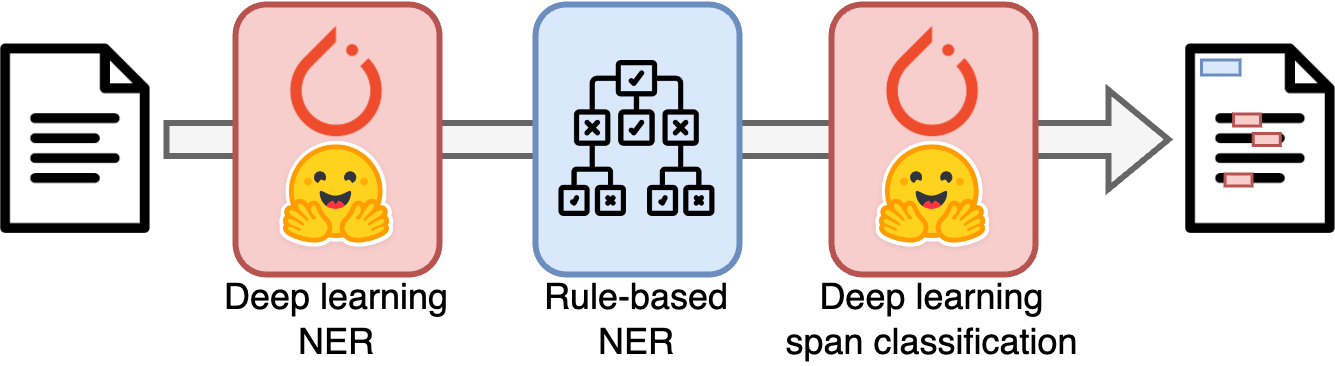
EDS-NLP was designed to facilitate the training and inference of hybrid models that arbitrarily chain static components or trained deep learning components. Static components are callable objects that take a Doc object as input, perform arbitrary transformations over the input, and return the modified object. Torch components, on the other hand, allow for deep learning operations to be performed on the Doc object and must be trained to be used.
Saving and loading a pipeline
Pipelines can be saved and loaded using the save and load methods. Following spaCy, the saved pipeline is not a pickled objet but a folder containing the config file, the weights and extra resources for each pipeline. Deep-learning parameters are saved with the safetensors library to avoid any security issue. This allows for easy inspection and modification of the pipeline, and avoids the execution of arbitrary code when loading a pipeline.
nlp.to_disk("path/to/your/model")
nlp = edsnlp.load("path/to/your/model")
Sharing a pipeline
To share a pipeline, save the model artifacts and turn them into a pip installable model package.
nlp.package(
    name="your-package-name",  # leave None to reuse name in pyproject.toml
    version="0.0.1",
    root_dir="path/to/project/root",  # optional, to retrieve an existing pyproject.toml file
    # if you don't have a pyproject.toml, you can provide the metadata here instead
    metadata=dict(
        authors="Firstname Lastname <your.email@domain.fr>",
        description="A short description of your package",
    ),
)
python -m edsnlp.package path/to/your/model \
  --name your-package-name \
  --version 0.0.1
This creates a wheel file in the dist folder.
Models with custom code
If your model uses custom project code, for instance a new torch component, the recommended release layout is to keep project code and model weights in separate packages.
- the project package contains custom pipes and factories
- the model package contains the saved artifacts and a generated
loadfunction - the model package depends on the project package
Release the code package through your normal project release process before publishing the model package. Then package the model with dependency mode.
nlp.package(
    name="eds-coding-aphp",
    version="2026.7.4",
    root_dir="path/to/project/root",
    code="dependency",
    code_check="error",
    publish_index="gitlab",
)
python -m edsnlp.package artifacts/model-last \
  --name eds-coding-aphp \
  --version 2026.7.4 \
  --code dependency \
  --code-check error \
  --publish-index gitlab
EDS-NLP infers the project dependency from pyproject.toml, for example eds-coding>=1.4,<1.5 for eds-coding version 1.4.0. You can override this with code_dependency if needed. With uv, a private index can be declared in pyproject.toml.
[[tool.uv.index]]
name = "gitlab"
url = "https://gitlab.example/api/v4/projects/123/packages/pypi/simple"
publish-url = "https://gitlab.example/api/v4/projects/123/packages/pypi"
explicit = true
uv publish --index gitlab dist/eds_coding_aphp-2026.7.4-py3-none-any.whl
When --publish-index is set, --code-check warn or --code-check error checks that the inferred code dependency is available on that index. It also compares the registry wheel with the local project package files, so unreleased local code changes are reported before the model package is built.
Use code="embed" for a self contained model package that bundles custom code with the weights. Avoid it for models that will be fine tuned and redistributed, because downstream packages can end up depending on obsolete base model weights. Use code="none" only when the runtime environment already provides every custom factory needed by the model.